Agree with everything said here. Very well put.
Even though all of our decks are back, we can no longer freely/easily play with them all as we could before. If we want to play with a deck past 100, we would have to Click Decks, My Decks, select format, try to find the deck and (as others have mentioned the large rectangular boxes with unnecessary information like # of cards, # of games & dates makes it hard to find, you used to be able to see more decks on a page and/or sort decks alphabetically or by date created, can’t do that anymore).
Or you could search it, either way, you have to go into the deck once you’ve found it, then Click Edit, then click Save, in order for it to go to your most recent 100 list (knocking off the current 100th deck at bottom list in the process). You now have to do this every time you want to play with a deck not in your most recent 100 list.
Also, why do so many of the decks say 0 cards, when there are 60 cards in them?
3 Likes
As I keep going in the “Decks” section more and more, I keep being annoyed at how it’s laid out. You’re taken to the public decks by default (even though people are usually going here to view their own decks), and then the button to see your own decks is tucked away in a place that feels unnatural (for some reason, I often find myself instinctually clicking on the “Home” button on the top left when I’m trying to find my decks). And as far as the public decks section goes, showing the most used decks by default feels so backwards. At least make it so we’re seeing new decks each time we’re there, which is what people are far more likely to be looking for/interested in, whereas almost all of the most used decks are over a decade old and not even good. The option to sort is nice, though. But I think I speak for everyone by saying that the focus going to the player’s own decks is closer to what people want, and more convenient and time efficient. I wouldn’t want a total inverse where public decks are tucked away, but I think the current layout you see when opening the “Decks” section would be just fine if it showed your own decks (sorted by latest!) under the new deck/import buttons, with a big button or something around the top right to access public decks (actually, just showing the public decks on the rightmost part of the screen like the site used to would probably be best…).
2 Likes
Haven’t seen it mentioned here, the free quest packs aren’t updating as you complete them they’re stuck on the number you had before the site transition.
The “type:has-ancient-trait” filter in the card database doesn’t work, you get 0 results. Also, finding the link to the forums to post this made me think that they’re too tucked away for how much is on them, the button being small and only existing at the very bottom of the homepage.
Search: has:ancient-trait - TCG ONE is the correct form. The other one shall be removed later.
Thanks for mentioning. It’s been fixed with today’s update. I’ll find a way to compensate the rewards which got lost during this time. Apologies for the inconvenience.
Appreciate the feedback. “My Decks” was added as a top level navigation element  Hope that fixes it.
Default sort for Deck Garage was changed to “latest”.
New sorting mechanisms were added for decks, including alphabetical!
The 100 deck limitation should’ve been fixed now! If you have any further feedback, I’ll be happy to know.
This should be also fixed now.
2 Likes
Great feedback! I’ve saved them to get back to them later.
Thank you 
You now cannot choose Quickplay decks in Career (assuming you owned all the cards). You used to be able to do this before the site change, provided that you owned all the cards in Career mode. They are entirely separate lists now, your quickplay decks no longer even show in the list when you are starting a Career game. Now you have to clone them all for play in Career mode.
Is there a fix for the No Deck ID stuff? I can’t seem to play most of my career decks, get that error message TWException: Game Error: Deck Not FOund “No Deck ID found”
Guys, putting everything in a separate browser was a bad idea.
-
I can’t claim any free packs from quests. The option seems to be disabled or broken, and honestly it feels like I’m wasting my time there. It’s frustrating.
-
The “deck ID not found” error keeps appearing. Sometimes you can’t even start new games.
-
Dissolving cards for coins is much harder now. Before, we could use a single option to dissolve cards without having to open a separate card window for each one.
-
You can’t browse cards alphabetically or by card type.
-
Building decks is actually harder. Before, you could just select a format and see what you had in your inventory. Now everything feels mixed together, so it’s more complicated.
-
I know the new display looks great, but I honestly can’t find any real improvement beyond the visuals.
I know you had good intentions with this update, but right now it’s not working well. 
I think the My Decks section should have a next page button at the end of the page, not just the start of it (and then the Deck Garage is the opposite way haha, it could probably use the same treatment).
Also, asking again for something like a button that takes you to the forums on the bar at the top of the new site.
1 Like
Whenever you’re viewing one of your own decks, the “Decks” button in the path near the top of the screen (“Home > Decks > etc.”) takes you to the public deck garage rather than back to your own decks, just as if you were viewing something from the deck garage. There should instead be a “My Decks” button in the path when viewing our own decks.
I now also see that the deck garage tab is highlighted instead of “My Decks” when viewing one of your own decks.
Edit 6/26/26: Really wish opening “Decks” just took me to my own decks instead of the public decks… adding the “My Decks” tab to the site that you’re on when you’ve already opened “Decks” doesn’t save me the extra click every single time I want to view my own decks. Seriously, 99% of the time people just want to view their own decks.
Also, “type:pokemon-star” in the card search only shows the Star cards from a few sets (though just searching “star” works well enough because it’s in their names), and this lack of functionality seems to apply to some other categories too, like Delta Species. And VStars are under Megas.
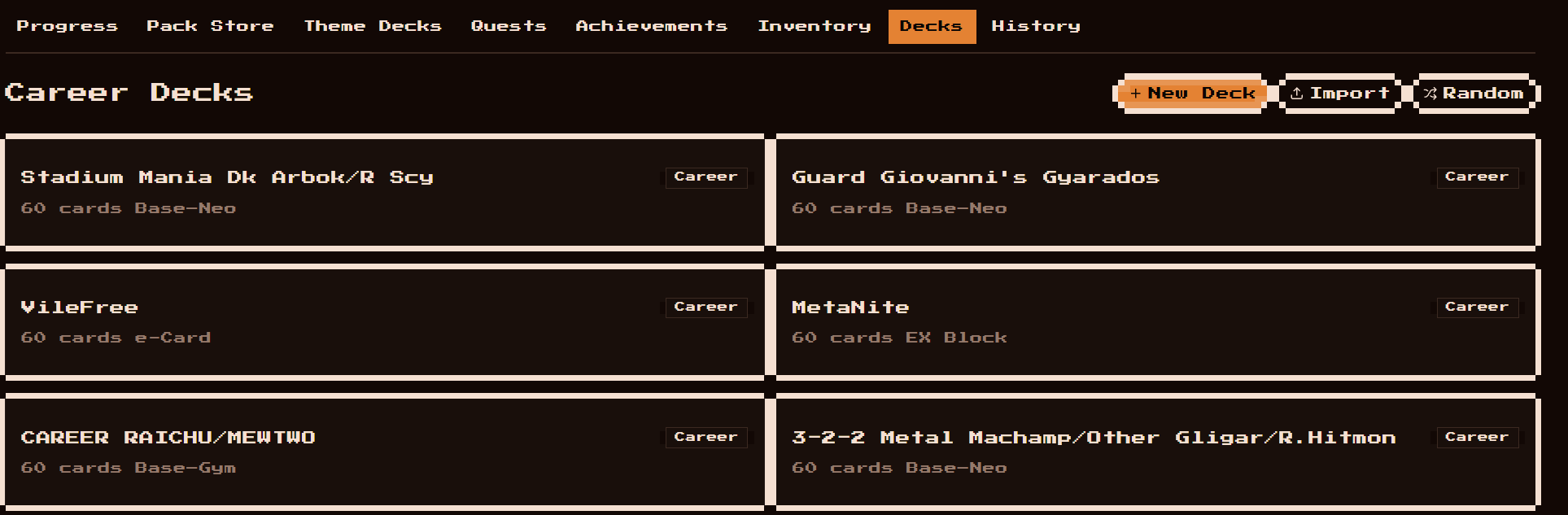
@admin There still seems to be a Deck limit in Career Mode Decks area. You can only have 50 decks total that are visible at any time. If you go over, the older ones disappear. Also, you can’t filter by format so they are all just in a random order making it hard to locate and edit them. Finally, I want to reiterate that before you could just select decks that you already made in quickplay and play them if you owned the cards in Career mode. You cannot do that now, and have to re-clone everything and re-save in Career mode (but again, limited to only 50 career decks right now). Please go back to where you can just play QP decks if you own the cards. in Career mode.
Image example below: No sorting/filteting options. All Career decks in various formats display in a random order.
1 Like
I could create you something a lot more advance